Holidays and Career Reviews

There’s always talk about finding a work-life balance. I think in some Utopian life that may exist but for the vast majority of us that’s not the case. Everyday life can be stressful. Work can be stressful. Supporting your family can be stressful. And depending on how things are faring out in home or work areas the scales are tipped decidedly in one direction or the other. Usually it’s never balanced. Travel is one of the best ways to re-evaluate what’s important in life and to re-assess how to best find that balance, are at least get it as close to what matters within your life. I was lucky enough to take a substantial break from work to travel with my family recently and introduce my parents to another grandchild.

I’ve been guilty in the past of putting my work in front of my home life, to the detriment of family relationships. Once we started to have children things changed but work still took preference. My ambition to succeed in my career was put ahead of most other aspects of my life. I had an issue of not wanting to let anyone down and not being able to say no and be assertive to ensure my family needs and that of my employer could both be fulfilled. I had put myself into that position by largely starting out eager to prove my worth and then getting caught out as a power-dynamic then existed that I was unable to get out of. The lesson was learnt the hard way. I’m happy to say that now I’m in a role where the correct power-dynamic exists and I have managed to hit the nice work/life balance which is something I truly believed didn’t exist before.

Read More

post

VMware ESXi 5.5 – Unable to Consolidate virtual machine disk files

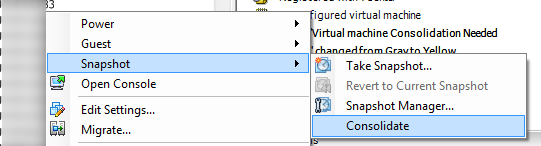
I’ve been working on an issue over the past couple of days where a backup has constantly been failing. the problem was isolated down to the fact that the VM has a warning that it required disks to be consolidated. Nothing major, or so I thought. I had a look at the datastore where the VM resides and it has 185 snapshot vmdk disks. Well that can’t be right! So I did a bit of investigation and found a number of VMware KB articles around the problem. The basic option is to follow KB 2003638 and just run a basic consolidation by going to Snapshot -> Consolidate.

consolidate snapshot

You’ll then be prompted to select Yes/No as you’ll have to consolidate the Redo logs. Select Yes.

consolidate snapshot continue

At this point it looked as it the consolidation was going to work but at about 20% it failed. The next error shows that the file is locked.

consolidate snapshot fail disk locked

There are a number of recommendations around what can be done to remove the lock on the file. One is to run a vMotion/svMotion in VMware to another host. Unfortunately due to these both being standalone ESXi hosts with no vMotion network or capabilities that couldn’t be done. Some people recommend reboot the ESXi host to release the lock but per my issue above, there was no vMotion network and these hosts run production manufacturing systems and cannot just be randomly rebooted. Waiting on a downtime approval would take too long. The next step was to restart the management agents on the ESXi host. This was done by connecting to the ESXi host via SSH and running the following commands: Read More

post

Cisco UCS – FSM:FAILED: Ethernet traffic flow monitoring configuration error

During a recent Cisco UCS upgrade I noticed an error for ethlanflowmon which was a critical alert. I hadn’t seen the problem before and it occurred right after I had upgraded UCS Manager firmware as per the steps listed in a previous post I wrote about UCS Firmware Upgrade. Before proceeding to upgrade the Fabric Interconnects I wanted to clear all alerts where possible. The alert for “FSM:FAILED: Ethernet traffic flow monitoring configuration error on” both switches was a cause for concern.

ethlanflowmon On further investigation I found that this is a known bug when upgrading to versions 2.2(2) and above. I was upgrading from version 2.2(1d) to 2.2(3d). Despite being a critical alert the issue does not impact any services. The new UCSM software is looking for new features on the FI that do not exist yet as it has not been upgraded. As soon as you upgrade the FIs this critical alert will go. More information about the bug can be found Cisco’s support page for the bug CSCul11595


post

Cisco UCS – CIMC did not detect storage controller error

During a recent UCS firmware upgrade I had quite a few blades show up with the error “CIMC did not detect storage”. Within UCSM I could see that the blade had a critical alert. It initially started after I upgraded UCS Manager firmware as documents in a previous post I wrote about UCS Firmware Upgrades. I did some searching around to find what may be causing the issue and the best answer I could find was to from the Cisco community forums to disassociate the blade, decommission and reseat within the chassis. I later spoke to a Cisco engineer and he advised of the same steps but that it was also possible to do without reseating the blade. This also looks like its a problem when upgrading from 2.2(1d) to other versions of UCSM but I haven’t been able to validate if it’s only that version or if it also affects others.

The full error I saw was for code F1004 and for Controller 1 on server 2/1 is inoperable. Reason: CIMC did not detect storage

cimc error

Within UCSM I could see there was an issue with the Blade

cimc error server blade

Before proceeding with the upgrade of the FIs, IOMs and Blades themselves I wanted to clear any alerts within UCSM, particularly critical alerts. The steps I followed to bring the blade back online were to go to the blade and select Server Maintenance
cimc server maintenance

Read More

post

The Life of NetApp – Bring out your dead!

There’s a quality scene in Monty Python’s Life of Brian where the dead are being called out to be loaded onto a cart to be taken away. Are new players in the market doing the same to NetApp? Even though they continue to say that they’re not dead everyone is writing them off and chucking them on the death-cart.

It’s easy to see why NetApp is being called to bring out its dead. There’s more and more players appearing in the storage market with serious differentiators to NetApp. Just look at the list of potential competitors like Pure Storage, Tintri, SimplivityNutanix and Nimble. And that’s not including the fully software defined storage groups such as Maxta, Stratoscale and a host of others. There’s also the old adversary EMC. All of these vendors have released new and innovative products in the past year and they have managed their marketing message far better than NetApp has. NetApp has been painfully slow at getting a smooth transition in place for its 7-Mode customers to Cluster Data OnTap (C-Dot). A lot of critics of NetApp also point to the fact that they are so heavily reliant on the OnTap software. I personally don’t see an issue with that reliance. Don’t change something just to create a new release for the sake of it. But the marketing message and the perception by the community of NetApp has caused a number of issues for them.

Read More

post

UCS Director – Schedule Database Backup script

I had a problem a while ago where UCS Director crashed during a Metrocluster failover test. It was caused by the delay in the transfer of writable disks on the storage which in turn caused the VM kernel to panic and set the disk to read only. After that problem, and due to other restore issues within the infrastructure as well as not having a backup prior to the failover test I was left with a dead UCS Director appliance. It was essentially completely buggered as the Postgres database had become corrupt. Cisco support were unable to resolve the problem and it took a lot of playing around with NetApp snapshots to pull back a somewhat clean copy of the appliance from before the failover test. Really messy and I wouldn’t recommend it.

Since then I’ve been capturing weekly backups of the UCS Director database to a FTP server so I have a copy of the DB to restore should there be any problems with the appliance again. This script is not supported by Cisco so please be aware of that before implementing it. To set up the backup create a DB_BACKUP file in /usr/local/etc with the following:

#!/bin/sh
# server login password localfile remote-dir
upload_script(){
 echo "verbose"
 echo "open $1"
 sleep 2
 echo "user $2 $3"
 sleep 3
 shift 3
 echo "bin"
 echo $*
 sleep 10
 echo quit
}
 
doftpput(){
 upload_script $1 $2 $3 put $4 $5 | /usr/bin/ftp -i -n -p
}
 
/opt/infra/stopInfraAll.sh
/opt/infra/dbBackupRestore.sh backup
BKFILE=/tmp/database_backup.tar.gz
if [ ! -f $BKFILE ]
then
echo "Backup failed. "
return 1
fi
export NEWFILE="cuic_backup_`date '+%m-%d-%Y-%H-%M-%S'`.tar.gz"
export FTPSERVER=xxx.xxx.xxx.xxx
export FTPLOGIN=< ftp user name >
export FTPPASS=<ftp password>
doftpput $FTPSERVER $FTPLOGIN $FTPPASS $BKFILE $NEWFILE
nohup /opt/infra/startInfraAll.sh &
 
exit 0

Next you’ll need to edit your cron jobs on the appliance. You can use the crontab -e  command to edit the schedule settings and enter:

1 2 * * 0 /usr/local/etc/DB_BACKUP > /dev/null 2>&1


And there you go, you now have a weekly scheduled backup of your UCS Director database.

 DB backup pathc

post

UCS Director – BareMetal Agent Installation Version 5.2, Upgrade to 5.3

UCS Director Baremetal Agent Installation:

Before commencing the Installation of the Baremetal Agent appliance I would recommend that UCS Director has been fully installed and is available before proceeding. If you need to install UCS Director as an initial installation there’s some great documentation on the Cisco site but you can also check out the blog post by Jeremy Waldrop. It’s for an older version of UCS Director but the installation steps still count for the current version. If you are upgrading from a previous version of UCS Director then you can check out a previous post I did on upgrading UCS Director from 5.1 to 5.3.

Useful Documents:

Cisco UCS Director Baremetal Agent Installation and Configuration Guide, Release 5.2

Cisco UCS Director Baremetal Agent Installation and Configuration Guide, Release 5.3

Download Software:

Go to Cisco Download for UCS Director  and select first UCS Director 5.3. Download the Cisco UCS Director Baremetal Agent Patch 5.3.0.0

UCSD Bare Metal Upgrade Download Accept the license agreement

UCSD Bare Metal Upgrade Download license agreement

The download will begin

UCSD Bare Metal Upgrade Downloaded File

Next, go back to the main UCS Director download page and select UCS Director 5.2.

UCSD Bare Metal Upgrade OVF DeploymentAccept the license agreement

UCSD Bare Metal Upgrade license agreement

The download will begin

UCSD Bare Metal Upgrade Patch Download File

Read More

post

UCS Director – Upgrade Version 5.1 to 5.3

Cisco have recently release a new version of their orchestration product UCS Director. The new release is version 5.3 and includes a raft of new features of which the majority are around improved reports and APIC support. Another new feature update is the support for NetApp OnTap 8.3. My primary reason for performing the upgrade is to leverage the reports and enhancements to workflow execution. It’s also been almost a year since the 5.1 installation was performed and I want to keep my systems up to date as much as possible. I’m currently running UCS Director 5.1.0 and Baremetal Agent 5.0.

Some of the new features in UCSD 5.3 are:

  • Support for C880 M4 Server
  • Support for Versa Stack and IBM Storwize
  • Enhancements to EMC RecoverPoint
  • Enhancements to VMware vSphere Support (VSAN Support)
  • Enhancements to Application Controllers (Cisco APIC)
  • Enhancements to workflow execution
  • Enhancements to the script module
  • Enhancements to UCSD REST APIs
  • Enhancements to Managing NetApp Accounts (including support for OnTap 8.3)
  • Enhancements to Cost Models and Chargeback features
  • Changes to Report APIs

You can find more about the features in the release over on the Cisco UCS Director 5.3 Release Notes site.

There are two components to the release, UCS Director itself and the Baremetal Agent upgrade. The supported upgrade paths for both components are:

Cisco UCS Director

Current Release Direct Upgrade Supported Upgrade Path
Release 4.0.x.x No 4.0 > 4.1 > 5.1 > 5.3
Release 4.1.x.x No 4.1 > 5.1 > 5.3
Release 5.0.x.x No 5.0 > 5.1 or 5.2 > 5.3
Release 5.1.x.x Yes 5.1 > 5.3
Release 5.2.x.x Yes 5.2 > 5.3

Read More

Leap Second Year – Impact on Cisco Equipment

Our network engineer sent out an email last week about a potential bug due to this year being a Leap Second Year. This wasn’t something I was aware of before so I did a bit of a search for not only the impact of the bug and what exactly a Leap Second is. As it turns out due to rotational variations of the planet the atomic clock can be out of sync. When this gets to 0.9 second the International Earth Rotation and Reference System (IERS) announces that a leap second will be added to the clock.

On midnight on June 30 this year the world atomic clock will have one second added to align the atomic clock to variances in the earths rotation. This is not the first occurance of this, there’s been 26 of these additional seconds added to the atomic clock since 1972. The last of these changes was in 2012. So what’s the big deal? Well, since the vast majority of computer systems use NTP to lock in their time settings the additional second will cause the same second to occur twice and this has the potential to cause some damage or downtime due to reboots. In 2012 some high profile companies such as Qantas, LinkedIn and Yelp suffered from outages as their equipment rebooted as it wasn’t able to handle the leap second. Cisco has worked to put both software/firmware updates or workarounds in place to help their customers resolve any potential impact. You can find more information about the Leap Second over on Cisco’s site.

As soon as I read the email I began to check out which systems are affected by this problem. The focus was obviously on the Cisco equipment within our Flexpod environment. This includes Nexus 7000, Nexus 5000, UCS Manager, UCS Fabric Interconnects, Cisco MDS switches and lastly Cisco UCM sitting on the infrastructure. I’ll go through each system, the symptoms, known affected systems and known firmware fixes. For more information on each component click on the header of the section and it’ll bring you directly to the Cisco bug search site.

Cisco Nexus 7000:

When the leap second update occurs a N7K SUP1 could have the kernel hit what is known a “livelock” condition under the following circumstances:

a. When the NTP server pushes the update to the N7K NTPd client, which in turn schedules the update to
the Kernel. This push should have happened 24 hours before June 30th, by most NTP servers.
b. When the NTP server actually updates the clock

Workaround:

On switches configured for NTP and running affected code, following workaround can be used.
1) Remove NTP/PTP configuration on the switch at least two days prior to June 30, 2015 Leap second event date.
2) Add NTP/PTP configuration back on the switch after the Leap second event date(July 1, 2015)

Known Affected Releases:

5.5(1)E2, 5.5(2), 6.0(4)

Known Fixed Releases:

5.2(6.16)S0, 5.2(7), 6.1(1)S28, 6.1(1.30)S0, 6.1(1.69), 6.2(0.217), 6.2(2)

Read More

NetApp – Create a new volume on vFiler (7-mode)

I had to create a new volume on a vfiler recently. This is a fairly straight-forward tasks for long term NetApp admins but I thought I’d write up the process for the next time that I forget. In this example the vfiler already exists and has been exported on a different subnet than the root vfiler, vfiler0. If you’re new to vfilers then you’ll immediately notice that once you change the vfiler context to the vfiler you want to add a volume to that you don’t have the option to create a new volume. The new volume needs to be created at the root vfiler level and then assigned to the vfiler you wish. In this example I am create a new ISO datastore on a vfiler context so that one of our tenants can have their own ISO datastore. We could present out the ISO datastore from vfiler0 but that would break the security model we worked hard to put in place.

The first thing to do is change the vfiler context and then run the vol command. You will see from this that it’s not possible to create the volume directly on the vfiler.

vfiler context <tenant-vfiler>
tenant-vfiler@NTAPcontroller> vol
The following commands are available; for more information
type "vol help "
offline             options             restrict            status
online
tenant-vfiler@NTAPcontroller> vol create iso01 aggr1 200g
vol: No such command "create".
The following commands are available; for more information
type "vol help "
offline             options             restrict            status
online

So go back to the parent vfiler, vfiler0, and then create the new volume. From there you can add it to the tenant-vfiler. Before transferring the volume to the tenant-vfiler I have also changed the options to make the volume thin provisioned using the “guarantee none” setting and also set fractional_reserve to 0. The commands used to create the new volume, modify the settings and add it to the tenant-vfiler were:

tenant-vfiler@NTAPcontroller> vfiler context vfiler0
NTAPcontroller> vol create iso01 -s volume aggr1 200g
NTAPcontroller> vol options iso01 guarantee none
NTAPcontroller> vol options iso01 fractional_reserve 0
NTAPcontroller> vol status iso01
  Volume State          Status            Options
  iso01 online          raid_dp, flex     create_ucode=on, convert_ucode=on,
                        mirrored  guarantee=none, fractional_reserve=0
                        64-bit
                        Volume UUID: 0df82cec-fdb8-11e4-a27a-123478563412
                Containing aggregate: 'aggr1'

NTAPcontroller> vfiler add tenant-vfiler /vol/iso01
WARNING: reassigning storage to another vfiler does not change the security information on that storage. If the security domains are not identical, unwanted access may be permitted, and wanted access may be denied.
Tue May 19 09:47:47 EST [NTAPcontroller:cmds.vfiler.path.move:notice]: Path /vol/iso01 was moved to vFiler unit "tenant-vfiler".
Tue May 19 09:47:47 EST [NTAPcontroller:export.auto.update.disabled:warning]: /etc/exports was not updated for iso01 when the vol destroy command was run. Please either manually update /etc/exports or copy /etc/exports.new to it.
NTAPcontroller>

Read More